Thursday, December 25, 2008

Final Instruction Cards


Not much to say here, these are the final two instruction cards I've created for the MAME cabinet. These should simplify things for "any" user of the MAME cabinet. Even serving as a reminder to myself in the event that I forget what I am doing after a few Corona's.

Please feel free to leave comments.

Thursday, December 18, 2008

Revised Instruction Card


Took some ideas from the guys over at www.cgcc.ca & slightly revised the image. Not sure if this will be the final but here it is.
I know I need to fix MIKES as it should read MIKE'S.

Instruction Cards


So I've finished wiring up the IPAC and it was tested for a short period last night. But more on that later. I'm still new to MAME so I found myself constantly referring back to a print out I created so I would know how to navigate MAME. For example, I had tested Street Fighter II rainbow and wanted to return to the main menu. How do I do this using the IPAC ? Anyway its not hard, just wasn't possible for me to memorize during the short game play I had. So it got me thinking, if I go with the 19" monitor I had planned I will have tons of negative space on the bezel. The solution was to design some instruction cards that I could get custom printed. I could even go with a simple 5'x7' design and print at a local Wal-Mart. I had been thinking of ordering a Dynamo logo sticker to place on the top of the bezel anyway, these "instruction cards" would provide more visual interest.

I want my MAME machine to be very user friendly, something that when people come over they can power on and play. I don't want anyone to come get me because they are done playing Tetris and now want to play Pac-Man. That's why I think the idea for the "instruction card" is great. Players will now know how to switch games, add credits, pause the system, etc.

I plan on designing a second card that will tell users what can be found in my favorites (not title for title, but pointing out that it contains titles hand picked by myself) and instruct them on how to get to "all games." This way if a player is unable to locate a game of his/her choice in my favorites they will have a general idea of how to locate it.

That's it for now! Ill post pics later of my completed IPAC and me testing it.

Wednesday, December 17, 2008

Start Me Up!


So once again progress is being made and my MAME project is once again the subject of my affection. I guess like many things out of sight out of mind perhaps. Tucked away in the basement with many other things on the roster MAME simply became forgotten. Well perhaps not forgotten, as it bothered me to leave the machine uncared for as long as it was. None the less I'm back in the game!

As I mentioned in the previous post I began wiring up the IPAC after having the microswithces/cherryswitches in my possession for about 2 months. I haven't completed it as of yet,but its getting there. I still need to wire up player one into the IPAC and wire up the 1 and 2 player start buttons. That's it! when that's done its DONE.

From there I can take my control panel upstairs and make sure it works the way it should. Make sure all the buttons fire, and the directions work. I also need to make sure I'm happy with the overall function. The IPAC can be reprogrammed, but as mention on the Ultimarc site it does perform shifted functions. Simply put it should be able to perform all the required commands without any need to reprogram. For your reference the link is below.
http://www.ultimarc.com/

The MAME Mystery

I wanted to make sure that my MAME project would be simple to use. Not only for myself, but anyone that wanted to play. With the mouse and keyboard tucked away it had to boot up and go right into MAME. Everything needs to be controlled from the joysticks and buttons. I thought this was a must! I had even read that you could change the BIOS(?) and even remove Windows load screens. I didn't want to get that elaborate,but I knew %100 that my machine needed to boot right into MAME. After doing a little research I found out its a rather simple process.
(1) Locate your main MAME folder & create a shortcut of the EXE file
(2) Take the EXE file and deposit it into your start up
(3) Run msconfig and make sure you see the EXE file

With all that done your PC should fire up and MAME should start without any prompting. Now what I did......... well I took the EXE file and removed it entirely from the MAME folder. I then put the EXE into my start up. MAME did start up as I wanted,but my settings and favorites were gone. I couldn't for the life of me figure out what had happened. I was trying to create new INI files, but my favorites were still M.I.A! Anyway I had asked around and figured out that by removing the EXE file I had perhaps created a duplicate MAME install. I removed the EXE leaving behind the shortcut and everything now works the way it should.

When my PC turns on it takes about 30 seconds of so before MAME itself appears on screen. To provided a more true "arcade look" I plan on removing all the icons from my desktop. Having my desktop appear clean and free of anything that would identify it as a PC. Ill then create a custom DTI (desktop image) featuring the MAME logo that states "please wait while loading." Again it serves no function,but I think it will look good and let new players realize they need to wait before playing.

Saturday, December 13, 2008

Me, The iPod & The IPAC


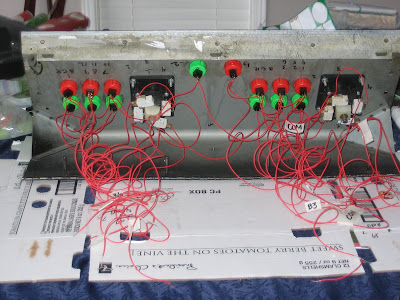
So last night was one of those nights I decided there was going to be no TV. I would clean,read,surf the net,whatever...just not watch TV. So once I got home I cleaned my dogs kennel,took her for a walk,then went online for a bit. When I was done I went downstairs and gazed at my control panel. I decided enough was enough, I didn't need to wait until my vacation to complete my MAME project. So I took the control panel up to the kitchen (so I could watch the dog) and fired up some tunes on the iPod and away I went. I first had to clean off some of the cherry switches, making sure I could see the hole and run the wire through it. In then installed the remaining cherry switches on the control panel. Slowly but surely I started to wire up all the components. As I did I was sure to label each wire, making sure my commons (ground), buttons, and all directions were clearly visible. I figured this would help speed things up when I was ready to connect the IPAC. I still have to complete player two,but I don't think it will take more then an hour on Sunday. Today (Saturday) there is just far to much other stuff to do. But I must say I'm glad I made some progress. As I mentioned prior I now have my XP computer set up to boot right into MAME. Ive made sure that MAME runs in full screen and the mouse cursor inst visible. Ill need to spend a little time online trying to figure out where my favorites folder vanished to. This is a real sticking point for me! It was so great to have all my favorites "streamlined" and displayed in one location. Ah well more on that as it develops. As always Ive included pictures with my post.

Thursday, December 11, 2008

Where O' Where Did My Favorites Go ?


So my favorites folder has just vanished! I don't get it, I don't know why, its just gone. It had been awhile since I was on my XP PC, and awhile since I had used MAME. When I did use it the other day I had a couple of issues. MAME did not see any of my ROMS...in fact it saw nothing. It took me awhile to figure it out,but I did resolve the problem. Earlier in the day I had un-installed several programs from the PC, I also configured the PC so that it would boot up into MAME. I'm not sure, but I'm guessing by doing this I messed a few things up. I was able to re-point (not sure of the term) MAME to all the required folders. It now knew where to look for ROMS, marquees,saves,etc. However the folder I once created with about 200 titles I liked to call "my favorites" was missing. I was able to right click on games and send the to "my favorites" however I CANT FIND THE F**KING FOLDER ! If anyone has any ideas as to what I could do please email me : vibefx@gmail.com

A Small Victory


So I guess its fair to say that in the world of MAME not everything (or anything) goes my way. Some things still remain true to this day, time and dedication seem to escape me with ease. Its not that I'm happy about it, its just what happens.
I had set a personal goal to complete my project for December. But like many of us the holiday season is a busy one, and if time was hard to come by prior...its harder now. So with that realization kicking me in the ass I said I would be done this project for January. I have a nice chunk of time off in December and in many respects very little to do on the MAME project. It really is a shame to let it sit there doing nothing since around September. There are many days when I go home and say "I'm not watching TV today!." It doesn't seem like much,but not hitting the sofa means I get stuff done. All I need is a few days to say, "I'm not watching today today" and make my way downstairs to work on the MAME project.

So where does that leave me ? What has been done ? Whats left ?

Whats been done ?

- Taking some advice I got from the good people over a www.cgcc.ca I was able to get my PC to boot right up into MAME. It was rather simple, take the .exe file from the MAME folder itself and drop it into your start up. When your PC turns on MAME should start right away. To make sure its there type "msconfig" & look under "start up."
This worked like a charm for me! However the PC is a little slow in going into MAME, but not enough to bother me. What I will do is clean up my desktop as it is visible for a few seconds. Make sure no icons remain on the desktop, and perhaps prepare a custom background (desktop image).

- I was able to pick up a 25/27" RCA TV with a s-video input. This is great as it would better resemble what was originally in the cabinet. It also leaves me my 19" for a possible cocktail project in the future. Even a smaller classic style cabinet. The problem however is my computer doesn't have an s-video output. When I tried a "better" video card awhile ago I thought the results were in fact worse then prior.

- I'm now seeking out a new yet old/used PC to run a different build of MAME on. Again thanks to the guys over at www.cgcc.ca I got a few different versions of FASTMAME. From what I was told/read/hear it helps to speed up some games. I know I found most Midway games (Narc/NBA Jam/Mortal Kombat) ran slow using my build of MAME. This could indeed fix that problem! I don't really want to mess with what Ive done on my PC, I'm happy with the set up thus far. However I think having the second PC could be a good idea. If it works better I would simply use it vs. my other machine. I also plan on adding a "better" video card with s-video out to this PC. If it does work better and the video card does what it should I can use it in connection with the RCA TV.

Whats left ?

- Still need to install the last 4 microswitches to joystick number two. Once that's done I can being to wire up the IPAC.

- Once the controls are fully wired Ill need to begin some testing. Just want to make sure everything works how it should before making the move into the arcade cabinet.

- Add monitor supports to the interior of the cabinet. Ive decided I would add my monitor supports to the inside of the cabinet and have the bolts visible on the side. I'm not going to add the expense of side art, so the bolts wont do any harm.

- Once Ive added the monitor supports (and shelf) I can install the monitor and cut the bezel.

- Now I take everything and put it inside, cross my fingers and hope for the best !

Where does that leave me ?

- If I'm lucky it leaves me with a finished product I can begin to use and enjoy on a steady basis. It leaves me with a little know how to help my brother and friend with their MAME projects.